Control Flow in JavaScript: If, Else, and Switch Explained
In programming, control flow means deciding which part of the code should run depending on a condition. Just like in real life, we make decisions based on situations.
Example:
If it rains → take an umbrella ☔
Else → go out normally
JavaScript uses if, else, and switch statements to make these decisions.
1. The if Statement

4
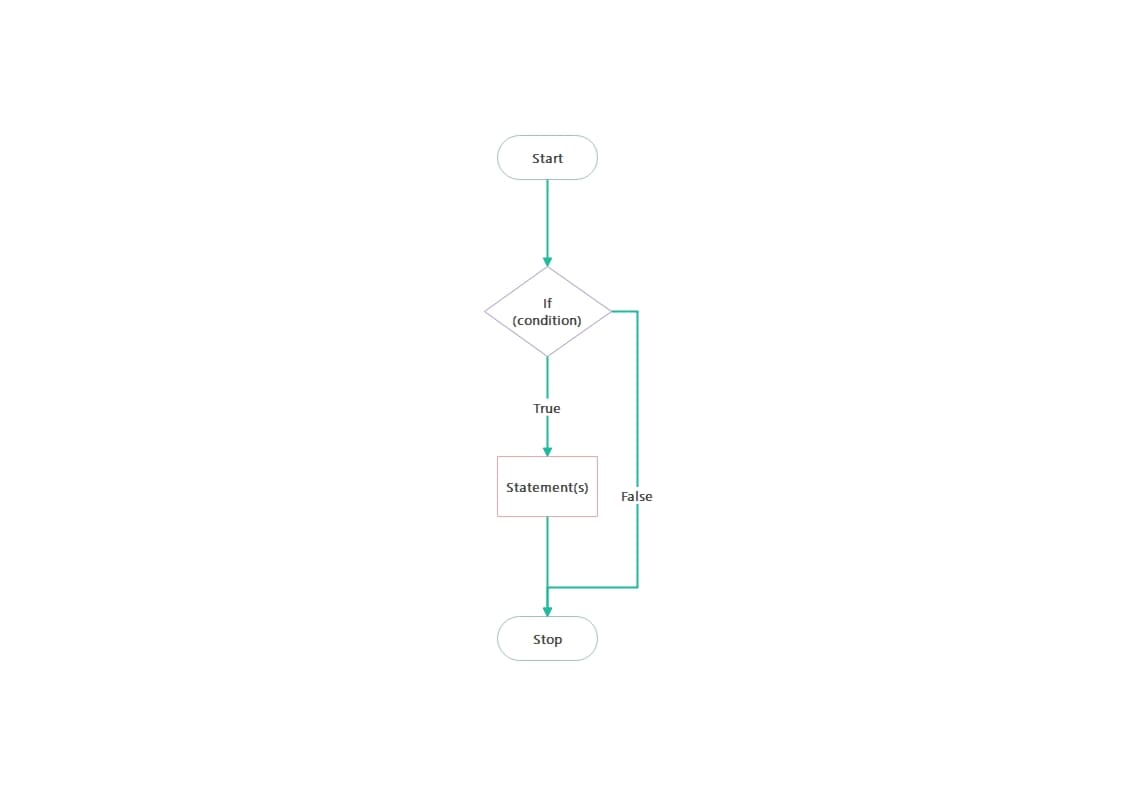
The if statement runs code only when a condition is true.
Example
let age = 18;

if (age >= 18) {
  console.log("You can vote");
}
How it works
Check the condition
age >= 18If true → run the code inside
{ }If false → skip the block
2. The if-else Statement
Sometimes we want two possible outcomes.
Example
let age = 16;

if (age >= 18) {
  console.log("You can vote");
} else {
  console.log("You cannot vote yet");
}
Flow
Condition true → first block runs
Condition false →
elseblock runs
This helps programs handle both situations.
3. The else if Ladder
When we have multiple conditions, we use else if.
Example
let marks = 75;

if (marks >= 90) {
  console.log("Grade A");
} else if (marks >= 60) {
  console.log("Grade B");
} else {
  console.log("Grade C");
}
Execution order
First condition is checked
If false → next
else ifrunsIf all fail →
elseruns
Only one block executes.
4. The switch Statement


4
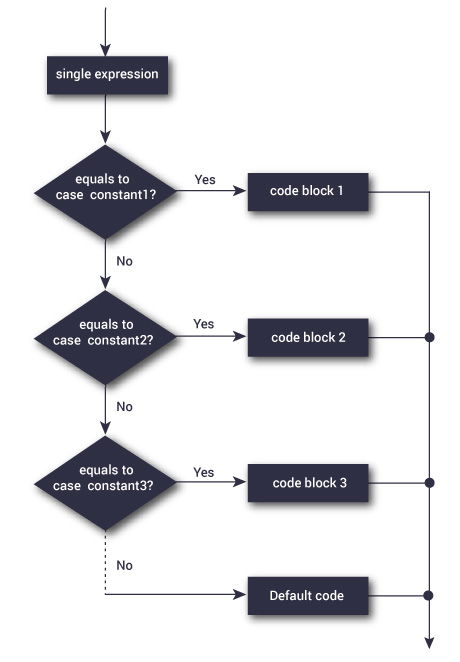
The switch statement is used when we compare one value against multiple cases.
Example
let day = 2;

switch(day) {
  case 1:
    console.log("Monday");
    break;

  case 2:
    console.log("Tuesday");
    break;

  case 3:
    console.log("Wednesday");
    break;

  default:
    console.log("Invalid day");
}
Why break is important
break stops the switch after a match.
Without it, JavaScript continues executing the next cases (fall-through).
When to Use switch vs if-else
| Situation | Best Choice |
|---|---|
| Checking ranges (age, marks, price) | if-else |
| Comparing one value with many options | switch |
| Complex conditions | if-else |
Example:
Marks grading →
if-elseDay of week →
switch
Assignment
1️⃣ Check Number Type
Write a program to check whether a number is positive, negative, or zero.
let num = 5;

if (num > 0) {
  console.log("Positive");
} else if (num < 0) {
  console.log("Negative");
} else {
  console.log("Zero");
}
2️⃣ Print Day Using Switch
let day = 3;

switch(day) {
  case 1:
    console.log("Monday");
    break;
  case 2:
    console.log("Tuesday");
    break;
  case 3:
    console.log("Wednesday");
    break;
  default:
    console.log("Invalid Day");
}
Explain why you used if-else or switch in your solution.
